
Bench Plugin
General MQTT stress testing tool, supports publish and subscribe stress testing
smart-mqtt adopts a plugin-based architecture design. While meeting basic MQTT services, it can derive diverse functions based on its plugin capabilities, such as: service metric statistics, cluster services, data routing, etc.
Almost every feature of the smart-mqtt enterprise edition is a plugin, and plugins are independent and self-governing from each other.
smart-mqtt’s plugin system follows these design principles:
In the Event Bus chapter, we showed you the relatively detailed internal architecture of smart-mqtt. But if we re-examine smart-mqtt from the plugin perspective, it will be a different scene (see diagram below).

By subscribing to different types of events on the event bus and matching different implementation strategies, many practical functions can be achieved. Of course, you can also completely detach from the event bus and create interesting plugins, such as: plugin hot-swapping, Broker service dynamic start/stop, etc.
Plugin is the base class for all plugins, defining plugin lifecycle methods:
| Method | Description |
|---|---|
pluginName() | Returns plugin name, defaults to class name |
getVersion() | Returns plugin version number |
getVendor() | Returns plugin developer information |
order() | Returns plugin loading priority, smaller value means higher priority |
install() | Install plugin (final method, cannot be overridden) |
uninstall() | Uninstall plugin (final method, cannot be overridden) |
initPlugin() | Plugin initialization logic, subclass implementation |
destroyPlugin() | Plugin destruction logic, subclass implementation |
schema() | Define visualization form for plugin configuration items |
BrokerContext is the core entry point for plugin interaction with Broker:
| Method | Description |
|---|---|
Options() | Get Broker configuration options |
getSession() | Get specified client’s session |
getOrCreateTopic() | Get or create topic |
getEventBus() | Get event bus |
getMessageBus() | Get message bus |
getProviders() | Get extension point providers |
getTimer() | Get timer |
bufferPagePool() | Get buffer pool |
The event bus is the core communication mechanism of the plugin system. Plugins respond to system behaviors by subscribing to events:
// Subscribe to eventbrokerContext.getEventBus().subscribe(EventType.CONNECT, event -> {    // Handle connection event});
// Publish eventbrokerContext.getEventBus().publish(EventType.TOPIC_CREATE, "sensor/temperature");| Event Type | Description |
|---|---|
CONNECT | Client connection request |
DISCONNECT | Client disconnect |
RECEIVE_MESSAGE | Receive client message |
WRITE_MESSAGE | Send message to client |
SESSION_CREATE | Create session |
TOPIC_CREATE | Create new topic |
SUBSCRIBE_ACCEPT | Accept subscription request |
UNSUBSCRIBE_ACCEPT | Accept unsubscription request |
BROKER_STARTED | Broker startup complete |
BROKER_DESTROY | Broker about to be destroyed |
Providers provides extension points for core functionality:
| Provider | Description |
|---|---|
SessionStateProvider | Session state storage extension |
SubscribeProvider | Subscription management extension |
We will continue to provide rich and practical plugins for enterprise users, and also encourage enterprises with R&D capabilities to support business needs through self-developed plugins.
Perhaps in the future, we will consider building a plugin marketplace to provide a platform for enterprises to showcase and share self-developed plugins, allowing quality work to benefit the entire industry.
Plugins have very low intrusiveness in smart-mqtt. If combined with code, you should be able to fully master its essence within a few minutes.
sequenceDiagram
    participant Broker as Broker Starter
    participant SL as ServiceLoader
    participant Plugins as Plugin Collection
    participant P as Specific Plugin

    Broker->>SL: Load all plugins in classpath
    SL->>Plugins: Discover and register plugin instances
    loop Sort by priority
        Broker->>Plugins: Get plugin list
        Plugins-->>Broker: Return sorted plugins
    end
    loop Install in sequence
        Broker->>P: Call install(context)
        P->>P: Execute initPlugin()<br/>Plugin initialization logic
        P-->>Broker: Installation complete
    end
    Broker->>Broker: Start Broker service
The above diagram shows the complete startup process of smart-mqtt service, with plugins in the middle. Plugin startup is divided into two steps:
classpath through ServiceLoader methodinstall method to install and enable pluginsprivate void loadAndInstallPlugins() throws Throwable { for (Plugin plugin : ServiceLoader.load(Plugin.class, BrokerContextImpl.class.getClassLoader())) { System.out.println("load plugin: " + plugin.pluginName()); plugins.add(plugin); } // Install plugins plugins.sort(Comparator.comparingInt(Plugin::order)); for (Plugin plugin : plugins) { System.out.println("install plugin: " + plugin.pluginName()); plugin.install(this); }}Uninstalling plugins is a necessary process for smart-mqtt Broker to stop service, ensuring graceful exit and full resource release.
sequenceDiagram
    participant Broker as Broker Container
    participant Plugins as Plugin List
    participant P as Specific Plugin

    Broker->>Broker: Stop receiving new connections
    loop Traverse in reverse order to uninstall
        Broker->>P: Call uninstall()
        P->>P: Execute destroyPlugin()<br/>Resource release logic
        P-->>Broker: Uninstallation complete
    end
    Broker->>Plugins: clear()
    Broker->>Broker: Destroy Broker service
The implementation code is as follows:
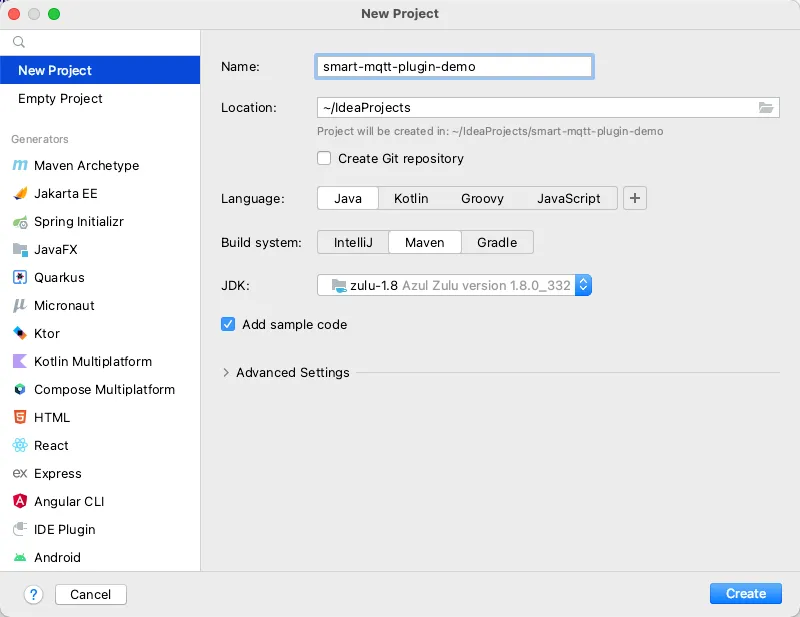
plugins.forEach(Plugin::uninstall);plugins.clear();Create a plugin project, a JDK 1.8 Maven project.
Add smart-mqtt-broker maven dependency and build plugin.
<dependencies>    <dependency>        <groupId>org.smartboot.mqtt</groupId>        <artifactId>smart-mqtt-broker</artifactId>        <version>1.5.0</version>    </dependency></dependencies>
<build> <plugins> <plugin> <groupId>org.apache.maven.plugins</groupId> <artifactId>maven-compiler-plugin</artifactId> <version>3.10.1</version> <configuration> <source>1.8</source> <target>1.8</target> <debug>false</debug> </configuration> </plugin> <plugin> <artifactId>maven-shade-plugin</artifactId> <version>3.3.0</version> <executions> <execution> <phase>package</phase> <goals> <goal>shade</goal> </goals> <configuration> <createDependencyReducedPom>false</createDependencyReducedPom> <transformers> <!-- Use append method --> <transformer implementation="org.apache.maven.plugins.shade.resource.AppendingTransformer"> <resource>META-INF/services/tech.smartboot.mqtt.plugin.spec.Plugin</resource> </transformer> </transformers> </configuration> </execution> </executions> </plugin> </plugins></build>Create a file named tech.smartboot.mqtt.plugin.spec.Plugin in the resources/META-INF/services directory, with the content being the fully qualified name of the plugin implementation class.
tech.smartboot.mqtt.plugin.demo.DemoPluginCreate plugin implementation class:
package tech.smartboot.mqtt.plugin.demo;
import tech.smartboot.mqtt.plugin.spec.BrokerContext;import tech.smartboot.mqtt.plugin.spec.Options;import tech.smartboot.mqtt.plugin.spec.Plugin;
public class DemoPlugin extends Plugin {
    @Override    protected void initPlugin(BrokerContext brokerContext) throws Throwable {        System.out.println("DemoPlugin initialized!");        // Write plugin initialization logic here        // For example: subscribe to events, register services, start threads, etc.    }
    @Override    protected void destroyPlugin() {        System.out.println("DemoPlugin destroyed!");        // Write plugin uninstallation logic here        // For example: release resources, stop threads, etc.    }
    @Override    public String pluginName() {        return "DemoPlugin";    }
    @Override    public String getVersion() {        return "1.0.0";    }
    @Override    public String getVendor() {        return "Your Company";    }
@Override public int order() { // Plugin loading order, smaller value means higher priority return 0; }}Run mvn clean package to package the plugin, place the generated jar file in smart-mqtt’s plugins directory, restart the service to take effect.
Plugins support configuration through plugin.yaml file, placed in the plugin’s storage directory.
@Overrideprotected void initPlugin(BrokerContext brokerContext) throws Throwable { // Load plugin configuration PluginConfig config = loadPluginConfig(PluginConfig.class); if (config != null) { System.out.println("Server URL: " + config.getServerUrl()); }}Configuration class definition:
public class PluginConfig { private String serverUrl; private int timeout;}Plugins can define visualization forms for configuration items by overriding the schema() method, facilitating dynamic configuration in the console.
import tech.smartboot.mqtt.plugin.spec.schema.Item;import tech.smartboot.mqtt.plugin.spec.schema.Schema;
@Overridepublic Schema schema() {    Schema schema = new Schema();    // Add string type configuration item    schema.addItem(Item.String("host", "Service Listen Address").col(6));    // Add integer type configuration item    schema.addItem(Item.Int("port", "Service Listen Port").col(6));    // Add password type configuration item    schema.addItem(Item.Password("password", "Access Password"));    // Add text area configuration item    schema.addItem(Item.TextArea("pem", "Certificate Content").height(400));    return schema;}
Supported configuration item types:
| Type | Description | Example |
|---|---|---|
string | Regular text input | Item.String("name", "Name") |
int | Integer input | Item.Int("port", "Port") |
password | Password input (hidden content) | Item.Password("pwd", "Password") |
textarea | Multi-line text input | Item.TextArea("content", "Content") |
object | Object type (can nest sub-items) | Item.Object("server", "Server Configuration") |
Implement custom client authentication logic:
@Overrideprotected void initPlugin(BrokerContext brokerContext) { brokerContext.getProviders().setAuthenticationValidator((client, username, password) -> { // Custom authentication logic return "admin".equals(username) && "123456".equals(password); });}Forward MQTT messages to other systems:
@Overrideprotected void initPlugin(BrokerContext brokerContext) { // Subscribe to message receive event brokerContext.getEventBus().subscribe(EventType.RECEIVE_PUBLISH_MESSAGE, event -> { MqttPublishMessage message = event.getObject(); // Send message to Redis, Kafka, etc. });}Collect and report service metrics:
@Overrideprotected void initPlugin(BrokerContext brokerContext) { // Regularly report metrics ScheduledExecutorService scheduler = Executors.newSingleThreadScheduledExecutor(); scheduler.scheduleAtFixedRate(() -> { // Collect metrics like connection count, message volume, etc. }, 0, 60, TimeUnit.SECONDS);}destroyPlugin() methodgetVersion() method, facilitate plugin version trackingsmart-mqtt officially provides multiple practical plugins. You can view the source code of these plugins in the Gitee Repository.
Bench Plugin
General MQTT stress testing tool, supports publish and subscribe stress testing
Auth Plugin
Simple username/password authentication
WebSocket Plugin
Provide WebSocket connection support
MQTTS Plugin
Provide SSL/TLS encrypted connection support
Redis Bridge Plugin
MQTT message and Redis integration
Cluster Plugin
Cluster functionality support